Showing posts with label tricks. Show all posts

Wednesday, July 28, 2010

TIPS - Different ways to Shutdown PC & Shutdown XP Faster..!!


There are so many different ways to turn off your Windows XP computer, let's look at some of them:


1. The standard approach - click the Start Button with your mouse, then select the Turn Off menu and finally click the Turn Off icon on the Turn Off computer dialog. blink.gif

2. Press Ctrl+Esc key or the Win key and press u two times - the fastest approach.

3. Get the Shutdown utility from Download.com - it add the shut down shortcuts for you. Else create them yourself using approach 4.

4. Create a shutdown shortcut on your desktop. Right click on the desktop, choose New Shortcut and type shutdown -s -t 00 in the area where you are asked to specify the location of the program file. Now you can just double click this icon to turn off the computer. The best location would be your quick launch bar.

5. Press the Win key + R key to open the run window. Type shutdown -s -t 00. [s means shutdown while t means the duration after which you want to initiate the shutdown process].

If some open processes or application won't let you turn off, append a -f switch to force a shut down by closing all active processes.


6. Win+M to minimize all windows and then Alt+F4 to bring the Turn Off computer dialog.

7. Open Windows Task manager (by right clicking the Windows Task bar or Alt+Ctrl+Del) and choose Shut down from the menu. Useful when the Windows are not responding.

8. open task manager--->click on shutdown--->hold the ctrl key and click on Turn off::::::: pc will be turned off in 3 secs.. fastest method other than hard shutdown


Like previous versions of windows, it takes long time to restart or shutdown windows XP when the "Exit Windows" sound is enabled. To solve this problem you must disable this useless sound.

1. Click Start button.
2. Go to settings > Control Panel > Sound, Speech and Audio devices > Sounds and Audio Devices > Sounds.
3. Then under program events and windows menu click on "Exit Windows" sub-menu and highlight it. Now from sounds you can select, choose "none" and then click Apply and OK.
4. Now you should see some improvements when shutting down your system.

Tips: USE YOUR NOTEPAD AS DIARY.


Ever wanted to maintain a diary on your PC ?
Now, you can do it without the use of a software !
USE NOTEPAD !

Do The Following :

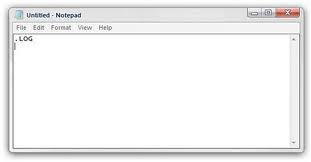
1. Open Notepad

2. Type : .LOG

3. Save it with any name say 'Diary'

4. Open Diary.txt again

Wow you see today's date and time, so start writing your Diary !

Tips: Rename a Series of Files


When you download photos from your digital camera, they often have unrecognizable names. You can rename several similar files at once with the following procedure. This also works for renaming other types of files.

1. Open the My Pictures folder. (Click Start, and then click My Pictures.) Or open another folder containing files that you want to rename.

2. Select the files you want to rename. If the files you want are not adjacent in the file list, press and hold CTRL, and then click each item to select it.

3. On the File menu, click Rename.

4. Type the new name, and then press ENTER.

Tips: Windows XP

How to change anyone password in xp without knowing it


If you log in to admin account and want to change password of admin or user then do the following steps

1. click start then run type cmd in it and hit enter command prompt opens

2. type net user it will show you user present in xp

3. type net user desired username new password and press enter all done

Make Xp genuine


MaKe Xp GeNuIne in 1 SeCond!

JUST COPY THE FOLLOWING CODE IN A NOTEPAD AND SAVE IT AS"GENUINE.REG"AND RUN THAT REG FILE!

Windows Registry Editor Version 5.00

[HKEY_LOCAL_MACHINE\SOFTWARE\Microsoft\Windows NT\CurrentVersion\WPAEvents]
"OOBETimer"=hex:ff,d5,71,d6,8b,6a,8d,6f,d5,33,93,fd
"LastWPAEventLogged"=hex:d5,07,05,00,06,00,07,00,0f,00,38,00,24,00,fd,02

[HKEY_LOCAL_MACHINE\SOFTWARE\Microsoft\Windows NT\CurrentVersion]
"CurrentBuild"="1.511.1 () (Obsolete data - do not use)"
"InstallDate"=dword:427cdd95
"ProductId"="69831-640-1780577-45389"
"DigitalProductId"=hex:a4,00,00,00,03,00,00,00,36,39,38,33,31,2d,36,34,30,2d,\
31,37,38,30,35,37,37,2d,34,35,33,38,39,00,5a,00,00,00,41,32,32,2d,30,30,30,\
30,31,00,00,00,00,00,00,00,00,0d,04,89,b2,15,1b,c4,ee,62,4f,e6,64,6f,01,00,\
00,00,00,00,27,ed,85,43,a2,20,01,00,00,00,00,00,00,00,00,00,00,00,00,00,00,\
00,00,00,00,00,00,00,00,00,00,00,31,34,35,30,34,00,00,00,00,00,00,00,ce,0e,\
00,00,12,42,15,a0,00,08,00,00,87,01,00,00,00,00,00,00,00,00,00,00,00,00,00,\
00,00,00,00,00,00,00,00,00,00,00,00,00,00,00,00,00,94,a2,b3,ac
"LicenseInfo"=hex:9e,bf,09,d0,3a,76,a5,27,bb,f2,da,88,58,ce,58,e9,05,6b,0b,82,\
c3,74,ab,42,0d,fb,ee,c3,ea,57,d0,9d,67,a5,3d,6e,42,0d,60,c0,1a,70,24,46,16,\
0a,0a,ce,0d,b8,27,4a,46,53,f3,17

Its All.

IT IS 100% TEATED AND WILL WORK SURE!
By making your XP genuine,u can now install softwares on ur pc
such as Windows Media Player 11 , Internet Explorer 7 , etc.


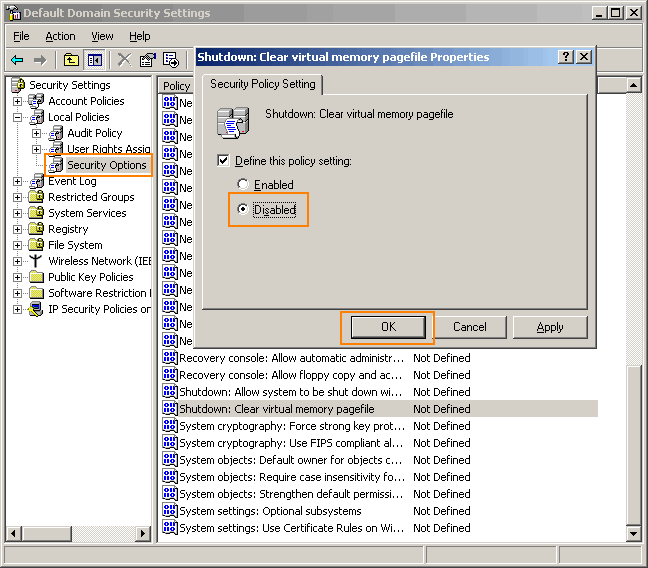
Go to Control panel Administrative tools, local security policy.
then goto local policies ---> security options.

Then change the option for "Shutdown: Clear Virtual Memory Pagefile"

Create a Password Reset Disk


If you’re running Windows XP Professional as a local user in a workgroup environment, you can create a password reset disk to log onto your computer when you forget your password. To create the disk:

1.Click Start, click Control Panel, and then click User Accounts.

2.Click your account name.

3.Under Related Tasks, click Prevent a forgotten password.

4.Follow the directions in the Forgotten Password Wizard to create a password reset disk.(u can use pen drive also)

5.Store the disk in a secure location, because anyone using it can access your local user account.

Disable CD Autorun


( WinXP PRO Only)

1) Click Start, Run and enter GPEDIT.MSC

2) Go to Computer Configuration, Administrative Templates, System.

3) Locate the entry for Turn autoplay off and modify it as you desire.

Tips: How to hide your drives.


If u r having any important docs and or some other type of data u r afraid about it . don't worry windows XP provides (not official ) a utility by which u can hide urs one or more drives .

1. Go to Start > run > type "diskpart".
a dos window will appear with following di$$$$$$ion.
DISKPART>

2. then type "list volume"

this will look like it

Volume### Ltr Label Fs Type Size Status Info
-------------- ---- ------ --- ----- ---- ------- -----

Volume 0 F DC-ROM
Volume 1 C NTFS Partition 7000MB Healthy
Volume 2 D soft NTFS Partition 8000MB Healthy
Volume 3 E ---- NTFS Partition 8000MB Healthy


3. if u wanna hide drive E then type "select volume 3"

then a message will appear in same windows { Volume 3 is the selected volume}

4. now type " remove letter E"
now a message will come { Diskpart Removed the Drive letter }
sometime it requires the reboot the computer .

Diskpart will remove the letter .Windows XP is not having capabilty to identify the unkown volume.

Don't afraid ur Data will ramin same .
to Come backe the Drive repeat the process . but in 4th step which is shown in this post replace " remove" to "assign"
i mean type " assign letter E"

Its all

Tips: WATCH MOVIES IN MS PAINT


> Open your favorite movie palyer and play the move

> Hit "PrintScreen", keep playing the movie in the player, dont stop it.

> Open MsPaint.

> Select "Edit>Paste" Or Hit "CTRL+V"

> Now You can watch movies in Paint!

> But there are no Pause, Next, Previous, Stop etc. buttons

> Experiment with other formats too, it doesn't play DivX , Flash movies, etc.

Tips: How To Lock Computer Shortcut

Creating Shortcut To Lock Computer


1. Right click an empty spot on the desktop, point to New and click Shortcut.

2. In the Create Shortcut dialog box, copy the following into the 'Type the location' of the item text box: "rundll32 user32.dll,LockWorkStation" remove quotes while typing.

3. Click Next.

4. In "Type a name for this shortcut", type LOCK or whatever you want and Click Finish

5. Now just click on that icon and enjoy. ...

Tips: How to change drive letters

 
To change drive letters (useful if you have two drives and have partitioned the boot drive, but the secondary drive shows up as "D")

Go to Start > Control Panel> Administrative Tools > Computer Management, Disk Management,

>then right-click the partition whose name you want to change
(click in the white area just below the word "Volume")

>select "change drive letter and paths."

From here you can add, remove or change drive letters and paths to the partition.

Tips: check who used your Pc in your Absence?

Steps:-->


start > run >eventvwr.msc

Events are stored in three log files: Application, Security, and System. These logs can be reviewed and archived.

For our purposes we want the System log. Click on "System" in the left-hand column for a list of events.

Look for a date and time when you weren't home and your computer should have been off.

double click on the eg: info n it will show u the detail.

You can also use this log to see how long someone was on the computer. Just look at the time the computer was turned on and off for that day.

Tips: lock, hide & password protect your folders...


Trick to lock folder
using this trick not only for locking folder but also hide it....
copy following script:-

cls
@ECHO OFF
title Folder Locker
if EXIST "Control Panel.{21EC2020-3AEA-1069-A2DD-08002B30309D}" goto UNLOCK
if NOT EXIST Locker goto MDLOCKER
:CONFIRM
echo Are you sure u want to Lock the folder(Y/N)
set/p "cho=>"
if %cho%==Y goto LOCK
if %cho%==y goto LOCK
if %cho%==n goto END
if %cho%==N goto END
echo Invalid choice.
goto CONFIRM
:LOCK
ren Locker "Control Panel.{21EC2020-3AEA-1069-A2DD-08002B30309D}"
attrib +h +s "Control Panel.{21EC2020-3AEA-1069-A2DD-08002B30309D}"
echo Folder locked
goto End
:UNLOCK
echo Enter password to Unlock folder
set/p "pass=>"
if NOT %pass%==mayank goto FAIL
attrib -h -s "Control Panel.{21EC2020-3AEA-1069-A2DD-08002B30309D}"
ren "Control Panel.{21EC2020-3AEA-1069-A2DD-08002B30309D}" Locker
echo Folder Unlocked successfully
goto End
:FAIL
echo Invalid password
goto end
:MDLOCKER
md Locker
echo Locker created successfully
goto End
:End

now go for following few steps
1. paste above text into notepad.
2. save that file by extension .bat ( name is ur choice)
3. now on ur screen there is a bat file appear.
4. double click on that file.
5. a new folder named locker will appear on the screen.
6. keep the files and folders u want to lock in that locker folder.
7. now again double click on that batch file to lock that locker folder.
8. after locking that folder it will become hidden.
9. to open that folder double click on that bat file
10. type ur password & open that folder.
11. password for the locked folder is mayank

Tips: How to change administrator password without know


1.Right click on MYCOMPUTER-MANAGE-LOCALUSERS&GROUPS-USERS

2.Right click on username (like administrator)

3.click on SET PASSWORD-PROCEED-

4.now set new password without entering old password.

Tips: Use your photo as ICON


1.open MSPAINT
2.open any image file
3.go to "saveas"
filename="anything"
save as type="24bit bitmap (*.bmp,*.bid)
save in: mydocument;
4.now right click on any folder
5.goto PROPERTIES-CUSTOMIZE-CHANGEICON-BROWSE-MYDOCUMENT- "ANYTHING"
then press ok..

Tips: hiding folders... without setting properties hidden


Right click on folder -> properties -> Customize -> change icon -> choose 13th icon in second row -> ok -> apply.

right click on folder -> rename -> Press Alt+0160 ->enter.

now folder will not be visible

Tips: Make Acrobat Reader Load Faster


Do u get irritated when acrobat reader takes 5/10 seconds to load when you want to open a pdf document. There is a way to speed up the loading.

Steps:
1. Go to the installation folder of acrobat reader
(C:\program files\adobe\acrobat\reader\.. whatever)

2. Move all the files and folders from the "plugins" directory to the "Optional" directory. (I repeat.. cut and paste the files NOT copy & paste).

Also make sure that acrobat reader is not open else it will lock the files and not allow you to move the files).

Now Adobe Acrobat will really fast and be just as good as notepad

Tips: Test your ANTI-VIRUS


here is a cool trick to test ur anti-virus tht itz workin properly or not
copy this code n paste it in NOTEPAD FILE n SAVE it as VIRUS.EXE...


CODE--->

X5O!P%@AP[4\PZX54(P^)7CC)7}$EICAR-STANDARD-ANTIVIRUS-TEST-FILE!$H+H*


if ur anti virus detects or deletes it its in a working condition............
but if itz not deletin diz file den u need to change your ANTI-VIRUS

Tuesday, July 27, 2010

Mobile battery - Saving TIPS..

If you're expecting a call and your battery icon starts blinking, the first thing you should do is find a charger. But if that's not an option, here are ten things you can do to hang on. We'll skip the usual tips about the 'memory effect' and which battery type is better — NiCd or Li-Ion — because you don't really have a choice in that.

Close Background Applications
If you're using a Smartphone, close applications that you don't need. Applications that stay active in the background use up a bit of CPU, which uses up battery. Make sure you 'exit' the applications from the menu, not by pressing the 'End' key, as that merely puts the application in the background. In Series 60 Smartphones (mostly Nokias), hold down the 'Menu' key to get a list of all applications running in the background to close them. In Windows Mobile 5 phones, open the 'Memory' application and check the 'Running programs' tab to close them.

Turn Down Screen Brightness
The screen is one of the most power-consuming parts of the mobile phone. The lower the brightness, the lesser power it needs. Keep it as low as you can, so long as you can still see it! Also, some phones like the E61 and the BlackBerry Pearl come with auto-adjust features that increase the brightness in brightly lit areas and dim it in low-light areas. If you're setting the brightness low, make sure that auto-adjust is turned off.

Don't Use Animated Wallpapers or Screensavers
The animations in wallpapers and screensavers can drain a bit of battery as they also consume a wee bit of CPU. Turn them off.

Turn Off Keypad Lights
If you've been using the phone for a while, you may be able to use the keys without seeing them. If this is the case, the keypad backlight can be turned off. However, not a lot of phones support this, but it's worth considering if your phone does.

Decrease Screen Standby Time Out
The time till your screen dims out and/or gets turned off is configurable in most phones. 10 seconds is good, 5 seconds is better. Set it as low as you can go without it becoming inconvenient.


Turn Off Vibration
Probably the second most power-consuming feature of any mobile phone is the built-in vibration alert. See if you can do without it.

Turn Down Ringer Volume, Keypad Tones and Speaker During Calls
If you're mostly indoors, like in the office or at home, a low ringer volume can go a bit towards saving your battery. Most phones also have DTMF-like keypad tones, which are not necessary if the keypad has decent tactile feedback. I keep them turned off most of the time — you can try it too. Volume of the earpiece when you're on a call can also be lowered, and that helps too.

Disable Voice Clarity / EFR / Voice Privacy
Almost all phones now do Enhanced Full Rate (EFR) for voice communication that consumes a little more power. In most cases, the enhanced quality of EFR doesn't make a difference thanks to the high noise levels in our city. Keep it off, you probably won't miss it. Some phones (mostly Samsungs) have a 'voice privacy' feature which can also be turned off to save battery.

Turn off 3G / GPRS / EDGE
Most 3G/UMTS/WCDMA phones keep searching for 3G coverage by default. In India, they'll keep searching till 2008, draining your battery, so go to the network selection screen and choose GSM-only. If your phone has a secondary camera near the screen, it's a 3G phone. Check your phone’s specs on the website if you aren't sure. Sometimes, even regular GPRS or EDGE connections stay active in the back, so make sure you specifically disconnect when you're done browsing the web.

Use Bluetooth and WiFi Only While Transferring
If you only use Bluetooth occasionally to transfer files to and from other devices, there's probably no point keeping it on all the time. Most phones only come with an on/off setting for Bluetooth, unlike the 'Turn on for 10 minutes' setting available for Infrared in some phones (mostly Sony Ericssons). People tend to forget about Bluetooth being left on after transferring the file — avoid doing this. Same goes for WiFi, if you're phone has that.

Here's another tip
find a USB cable if your phone supports recharging via USB. The Motorola RAZR/KRZR/SLVRs and most Windows Mobile Smartphones have a standard miniUSB slot that can use the same cable as most digital cameras. You're more likely to find one of these lying around somewhere than a charger for your phone, unless it's a Nokia, of course.

Finally, the last tip is not very recommendable, but it is something to consider if you've tried everything else above: don't use the phone too much. Of course, you can't use the camera and media features (most Samsung phones won't even let you, if the battery is low) but you can also be a bit choosy while answering incoming calls — not all of them need to be answered. This is even more true in case of unknown numbers!

Monday, July 19, 2010

Good tips for Heart

 
1. Drink eight glasses of water a day. 

2. Include two vegetables and one fruit in every meal.

3. Begin each meal with a raw vegetable salad.

4. Make a light snack of assorted sprouts.

5. Start the day with a glass of warm water and a dash of lime..

6. Use only fresh vegetables.

7. Once a week have only fresh fruits until noon, make lunch the first meal of the day.

8. Eat only freshly cooked meals, not refrigerated leftovers.

9. Include one green vegetable and one yellow vegetable in every meal.

10. Go on a juice fast for a day. Start with vegetable juice, and sip fruit for lunch and dinner..

11. Kick the old coffee habit. Have a glass of fresh fruit juice instead.

12. Cut out all deep-fried foods from your diet.

13. Cut down on high sugar products like soft drinks, ice-cream, candy and cookies in your diet.

14. Never skip a meal, even if you're on a diet. Eat a fresh fruit or have vegetable juice instead.

15. Avoid beverages like soda, coffee, colas and so on.

16. Include high fiber foods and plenty of fruits, vegetables and grains in planning your diet.

17. Use salt in moderation

18. Wash vegetables thoroughly in clean water before chopping.

19. Stream or boil vegetables (rather than fry or saute).

20. Retain peels of potato, cucumber, carrot and tomato while cooking.

21. Do take a moment off to mentally list out the nutritional value of the food you're about to eat.

22. Don't rush through your meals. Set aside enough time to appreciate, enjoy and digest your food.

23. Make every meal an enjoyable experience. Set dishes out attractively and chew slowly to appreciate the full flavor of the foods you eat.

24. Choose to be radiantly healthy. Keep yourself informed about the nutritive value of every food you buy.

25. Shop for groceries yourself. Notice the look, feel and smell of fresh fruit and vegetables and enjoy their intrinsic goodness.

26. Watch out for eating habits paired with emotional states, like reaching for a chocolate when youre depressed. Resist the urge and eat fruit instead.

27. Eat popcorn (rather than chips) while watching a movie.

28. Sit at the table at meal times. Don't read the paper or review bills while eating.

29. Make it a point to have dinner with the entire family at the table, and not in front of the TV.

30. Eat just to the point of the fullness. Don't stuff yourself!

31. Stop smoking.

32. Restrict alcohol consumption.

33. Get a good night's sleep, every night.

34. Enroll today in an exercise programme.

35. Take a brisk, 20 minute invigorating walk each morning.

36. Spend 10 minutes every morning and evening doing basic stretches.

37. Do not use elevators when you can climb the stairs.

38. Enroll in a TM programme today.

39. Focus on your breathing. Take a deep breath, then exhale slowly. Repeat a couple of times a day.

40. Learn to relax. Spend 20 minutes consciously relaxing each muscle of your body. . Spend 20 minutes a day in silent meditation, prayer or contemplation.

42. Learn the healing power of laughter. Watch a crazy movie, recall a joke or read a funny book and laugh out loud.

43. Tap the powers of your sub-conscious. Relax your body for 20 minutes and project the Perfect You're on your mind screen.

44. Balance your lifestyle. Devote equal time each week to work and fun.

45. Join kids in a sports activity and rediscover the joys of childhood.

46.. Do keep in touch with friends. Call up or visit them and be at peace with the world.

47. Enroll in an activity (like dancing, swimming or roller skating...) you never indulged in because you were afraid of what people might say.

48. Forgive someone who you think has done you wrong and cleanse your spirit of rancor.

49. Do a nice turn to someone you don't know too well, but who could do with a friend.

50. Spend a quiet half-hour chatting with your family.

51. Listen to soothing music for 15 minutes at least each day.

52. Read a great book once a week.

Friday, June 18, 2010

Tips: The inbuilt windows programs:----- !

Programs :

1. Private Character Editor :
Used for editing fonts,etc.
** start>>Run
** Now, type eudcedit

2. Dr. Watson :

This an inbuilt windows repairing software !
** start>>Run
** Now, type drwtsn32

3. Media Player 5.1 :
Even if you upgrade your Media Player, you can still access your old player in case the new one fails !!!
** start>>Run
** Now, type mplay32

4. iExpress :
Used to create Setups
You can create your own installers !
** start>>Run
** Now, type iexpress

exe files in run command
cmd : to open dos (with dos key)
calc : to open calculator
magnify : to open magnifier
regedit : to change registries
control : to open control panel
dvdplay : to open window media player
dxdiag : system information
charmap : to open character map
ntbackup : to open backup n restore box
taskmgr : to open task manager
msconfig : hide/unhide icons on taskbar(right side)
paintbrush : mspaint
group policy : gpedit.msc

22 Herbal Tips for Skin Care

1) Drink at least 8 glasses of water every day.


2) Cut some beet root into small pieces and grind them. Squeeze juice from beet root and massage to your face for 5 minutes. Shower after 10 minutes with mild soap or gram flour.


3) Mix sandalwood powder with rose water and add 4 to 5 drops of milk in it and apply on to your face and body. Shower after 15 minutes with warm water.


4) Mix honey in water and drink daily in the morning to keep your skin shiny and smooth.


5) Warm honey and mix with lemon juice and apply on to face. Wash after it dry.


6) Mix Turmeric, sandal powder and olive oil and apply to body. Shower after 10 minutes.


7) Massage your skin with milk. Milk has moisturizer, it will keep your skin smooth.


8) Use humidifiers and keep room temperature moderate to keep your skin away from dryness.


9) Hot water blushes your skin and you don't feel fresh unless you have bath with little cold water. If you have shower for a longtime, dead skin will be automatically be removed. Do not rub with towel, be gentle on your skin.


10) Take food which contains more A and C vitamin.


11) Grate carrot and boil. Massage that mixture to body to get fair and smooth skin.


12) For natural bleaching: - mix milk and lemon juice. The

milk will break as soon as you mix the lemon juice in it. Use that mixture to massage on your body. It works as natural bleaching.


13) Mix turmeric and cream on the top of milk, massage that mixture to body. 


14) If you go into sun your skin will lost the fair ness. To get your skin color to normal take equal quantities of cucumber juice and tomato juice and apply on to skin. Shower after 10 minutes.


15) Massage mustard oil to your skin for 5 minutes and have shower with gram flour or mild soap.


16) Mix cream on the top of milk and all-purpose flour and apply that paste on to your skin avoid eyes, eyebrows and lips. Shower after 5 minutes. This will make skin smooth.


17) Mix curds (yogurt) with wheat flour and apply to your skin and take shower after 5 minutes.


18) Grind rose petals and mix with cream on the top of milk and apply to your body. Shower after 10 minutes.


19) Scaly skin is a result of fluorine deficiency. Fluorine is the anti-resistant element of the human body, the absence of which creates problems in the blood and spleen. Since cooking and heating foods destroys fluorine, it is better to eat uncooked raw fruits and vegetables. Other foods rich in fluorine are goat milk and cheese, rye flour, avocados, sea plants and cabbage, cream whey and cottage cheese.


20) Wrinkle skin is a result of Sodium deficiency and makes skin sticky. Cucumbers are ideal for combating and preventing sodium deficiency because they are not only high in sodium, but also help in keeping the body cool, a great summer's treat.


21) Skin rashes are the result of silicon deficiency. To avoid pus and rashes, eat plenty of sprouts, alfalfa, barley, tomatoes, spinach, strawberries and figs.


22) Skin eruptions are the result of Chlorophyll. And are found in wheat grass and other green leafy vegetables  

Computer Tips : Stop Password Expiration

After you have run Windows XP for a while, you may receive this message when you log on: "Your password will expire in 14 days.....".

By default, Windows XP is set up with passwords which will expire after 42 days.

And 14 days in advance, Windows will start warning you of this fact.

Go to Start > Run > type control userpasswords2

Select the Advanced tab in the User Accounts window.

Press the Advanced button below the Advanced user management header.

Select Users in the Local Users and Groups.

In the right pane, right-click the user name for which you want to change the setting, and select Properties.

On the General tab, check Password never expires.

Click Apply and OK (all the way out)