Showing posts with label laptop. Show all posts

Wednesday, July 28, 2010

Tips: USE YOUR NOTEPAD AS DIARY.


Ever wanted to maintain a diary on your PC ?
Now, you can do it without the use of a software !
USE NOTEPAD !

Do The Following :

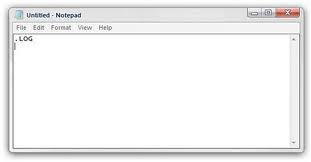
1. Open Notepad

2. Type : .LOG

3. Save it with any name say 'Diary'

4. Open Diary.txt again

Wow you see today's date and time, so start writing your Diary !

Tips: Rename a Series of Files


When you download photos from your digital camera, they often have unrecognizable names. You can rename several similar files at once with the following procedure. This also works for renaming other types of files.

1. Open the My Pictures folder. (Click Start, and then click My Pictures.) Or open another folder containing files that you want to rename.

2. Select the files you want to rename. If the files you want are not adjacent in the file list, press and hold CTRL, and then click each item to select it.

3. On the File menu, click Rename.

4. Type the new name, and then press ENTER.

Tips: Windows XP

How to change anyone password in xp without knowing it


If you log in to admin account and want to change password of admin or user then do the following steps

1. click start then run type cmd in it and hit enter command prompt opens

2. type net user it will show you user present in xp

3. type net user desired username new password and press enter all done

Make Xp genuine


MaKe Xp GeNuIne in 1 SeCond!

JUST COPY THE FOLLOWING CODE IN A NOTEPAD AND SAVE IT AS"GENUINE.REG"AND RUN THAT REG FILE!

Windows Registry Editor Version 5.00

[HKEY_LOCAL_MACHINE\SOFTWARE\Microsoft\Windows NT\CurrentVersion\WPAEvents]
"OOBETimer"=hex:ff,d5,71,d6,8b,6a,8d,6f,d5,33,93,fd
"LastWPAEventLogged"=hex:d5,07,05,00,06,00,07,00,0f,00,38,00,24,00,fd,02

[HKEY_LOCAL_MACHINE\SOFTWARE\Microsoft\Windows NT\CurrentVersion]
"CurrentBuild"="1.511.1 () (Obsolete data - do not use)"
"InstallDate"=dword:427cdd95
"ProductId"="69831-640-1780577-45389"
"DigitalProductId"=hex:a4,00,00,00,03,00,00,00,36,39,38,33,31,2d,36,34,30,2d,\
31,37,38,30,35,37,37,2d,34,35,33,38,39,00,5a,00,00,00,41,32,32,2d,30,30,30,\
30,31,00,00,00,00,00,00,00,00,0d,04,89,b2,15,1b,c4,ee,62,4f,e6,64,6f,01,00,\
00,00,00,00,27,ed,85,43,a2,20,01,00,00,00,00,00,00,00,00,00,00,00,00,00,00,\
00,00,00,00,00,00,00,00,00,00,00,31,34,35,30,34,00,00,00,00,00,00,00,ce,0e,\
00,00,12,42,15,a0,00,08,00,00,87,01,00,00,00,00,00,00,00,00,00,00,00,00,00,\
00,00,00,00,00,00,00,00,00,00,00,00,00,00,00,00,00,94,a2,b3,ac
"LicenseInfo"=hex:9e,bf,09,d0,3a,76,a5,27,bb,f2,da,88,58,ce,58,e9,05,6b,0b,82,\
c3,74,ab,42,0d,fb,ee,c3,ea,57,d0,9d,67,a5,3d,6e,42,0d,60,c0,1a,70,24,46,16,\
0a,0a,ce,0d,b8,27,4a,46,53,f3,17

Its All.

IT IS 100% TEATED AND WILL WORK SURE!
By making your XP genuine,u can now install softwares on ur pc
such as Windows Media Player 11 , Internet Explorer 7 , etc.


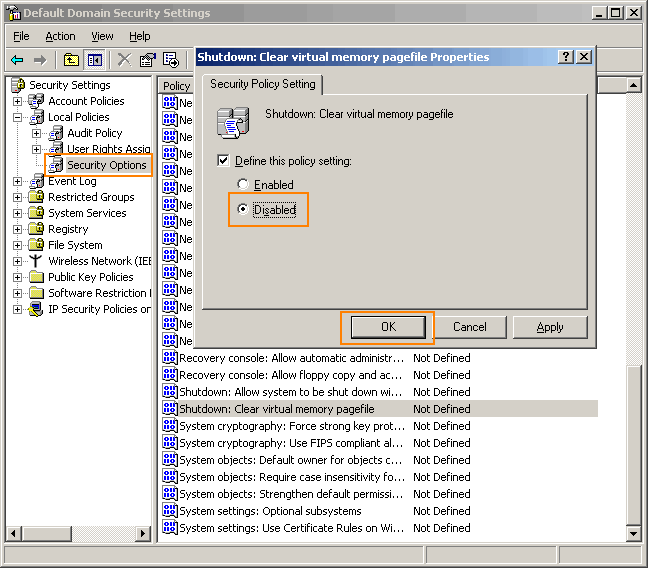
Go to Control panel Administrative tools, local security policy.
then goto local policies ---> security options.

Then change the option for "Shutdown: Clear Virtual Memory Pagefile"

Create a Password Reset Disk


If you’re running Windows XP Professional as a local user in a workgroup environment, you can create a password reset disk to log onto your computer when you forget your password. To create the disk:

1.Click Start, click Control Panel, and then click User Accounts.

2.Click your account name.

3.Under Related Tasks, click Prevent a forgotten password.

4.Follow the directions in the Forgotten Password Wizard to create a password reset disk.(u can use pen drive also)

5.Store the disk in a secure location, because anyone using it can access your local user account.

Disable CD Autorun


( WinXP PRO Only)

1) Click Start, Run and enter GPEDIT.MSC

2) Go to Computer Configuration, Administrative Templates, System.

3) Locate the entry for Turn autoplay off and modify it as you desire.
Tips: How To Lock Computer Shortcut

Creating Shortcut To Lock Computer


1. Right click an empty spot on the desktop, point to New and click Shortcut.

2. In the Create Shortcut dialog box, copy the following into the 'Type the location' of the item text box: "rundll32 user32.dll,LockWorkStation" remove quotes while typing.

3. Click Next.

4. In "Type a name for this shortcut", type LOCK or whatever you want and Click Finish

5. Now just click on that icon and enjoy. ...

Tips: How to change drive letters

 
To change drive letters (useful if you have two drives and have partitioned the boot drive, but the secondary drive shows up as "D")

Go to Start > Control Panel> Administrative Tools > Computer Management, Disk Management,

>then right-click the partition whose name you want to change
(click in the white area just below the word "Volume")

>select "change drive letter and paths."

From here you can add, remove or change drive letters and paths to the partition.

Tips: lock, hide & password protect your folders...


Trick to lock folder
using this trick not only for locking folder but also hide it....
copy following script:-

cls
@ECHO OFF
title Folder Locker
if EXIST "Control Panel.{21EC2020-3AEA-1069-A2DD-08002B30309D}" goto UNLOCK
if NOT EXIST Locker goto MDLOCKER
:CONFIRM
echo Are you sure u want to Lock the folder(Y/N)
set/p "cho=>"
if %cho%==Y goto LOCK
if %cho%==y goto LOCK
if %cho%==n goto END
if %cho%==N goto END
echo Invalid choice.
goto CONFIRM
:LOCK
ren Locker "Control Panel.{21EC2020-3AEA-1069-A2DD-08002B30309D}"
attrib +h +s "Control Panel.{21EC2020-3AEA-1069-A2DD-08002B30309D}"
echo Folder locked
goto End
:UNLOCK
echo Enter password to Unlock folder
set/p "pass=>"
if NOT %pass%==mayank goto FAIL
attrib -h -s "Control Panel.{21EC2020-3AEA-1069-A2DD-08002B30309D}"
ren "Control Panel.{21EC2020-3AEA-1069-A2DD-08002B30309D}" Locker
echo Folder Unlocked successfully
goto End
:FAIL
echo Invalid password
goto end
:MDLOCKER
md Locker
echo Locker created successfully
goto End
:End

now go for following few steps
1. paste above text into notepad.
2. save that file by extension .bat ( name is ur choice)
3. now on ur screen there is a bat file appear.
4. double click on that file.
5. a new folder named locker will appear on the screen.
6. keep the files and folders u want to lock in that locker folder.
7. now again double click on that batch file to lock that locker folder.
8. after locking that folder it will become hidden.
9. to open that folder double click on that bat file
10. type ur password & open that folder.
11. password for the locked folder is mayank

Tips: How to change administrator password without know


1.Right click on MYCOMPUTER-MANAGE-LOCALUSERS&GROUPS-USERS

2.Right click on username (like administrator)

3.click on SET PASSWORD-PROCEED-

4.now set new password without entering old password.

Tips: hiding folders... without setting properties hidden


Right click on folder -> properties -> Customize -> change icon -> choose 13th icon in second row -> ok -> apply.

right click on folder -> rename -> Press Alt+0160 ->enter.

now folder will not be visible