Showing posts with label shutdown. Show all posts
Wednesday, July 28, 2010
TIPS - Different ways to Shutdown PC & Shutdown XP Faster..!!
There are so many different ways to turn off your Windows XP computer, let's look at some of them:
1. The standard approach - click the Start Button with your mouse, then select the Turn Off menu and finally click the Turn Off icon on the Turn Off computer dialog. blink.gif
2. Press Ctrl+Esc key or the Win key and press u two times - the fastest approach.
3. Get the Shutdown utility from Download.com - it add the shut down shortcuts for you. Else create them yourself using approach 4.
4. Create a shutdown shortcut on your desktop. Right click on the desktop, choose New Shortcut and type shutdown -s -t 00 in the area where you are asked to specify the location of the program file. Now you can just double click this icon to turn off the computer. The best location would be your quick launch bar.
5. Press the Win key + R key to open the run window. Type shutdown -s -t 00. [s means shutdown while t means the duration after which you want to initiate the shutdown process].
If some open processes or application won't let you turn off, append a -f switch to force a shut down by closing all active processes.
6. Win+M to minimize all windows and then Alt+F4 to bring the Turn Off computer dialog.
7. Open Windows Task manager (by right clicking the Windows Task bar or Alt+Ctrl+Del) and choose Shut down from the menu. Useful when the Windows are not responding.
8. open task manager--->click on shutdown--->hold the ctrl key and click on Turn off::::::: pc will be turned off in 3 secs.. fastest method other than hard shutdown
Like previous versions of windows, it takes long time to restart or shutdown windows XP when the "Exit Windows" sound is enabled. To solve this problem you must disable this useless sound.
1. Click Start button.
2. Go to settings > Control Panel > Sound, Speech and Audio devices > Sounds and Audio Devices > Sounds.
3. Then under program events and windows menu click on "Exit Windows" sub-menu and highlight it. Now from sounds you can select, choose "none" and then click Apply and OK.
4. Now you should see some improvements when shutting down your system.
Tips: Windows XP
How to change anyone password in xp without knowing it
If you log in to admin account and want to change password of admin or user then do the following steps
1. click start then run type cmd in it and hit enter command prompt opens
2. type net user it will show you user present in xp
3. type net user desired username new password and press enter all done
Make Xp genuine
MaKe Xp GeNuIne in 1 SeCond!
JUST COPY THE FOLLOWING CODE IN A NOTEPAD AND SAVE IT AS"GENUINE.REG"AND RUN THAT REG FILE!
Its All.
IT IS 100% TEATED AND WILL WORK SURE!
By making your XP genuine,u can now install softwares on ur pc
such as Windows Media Player 11 , Internet Explorer 7 , etc.
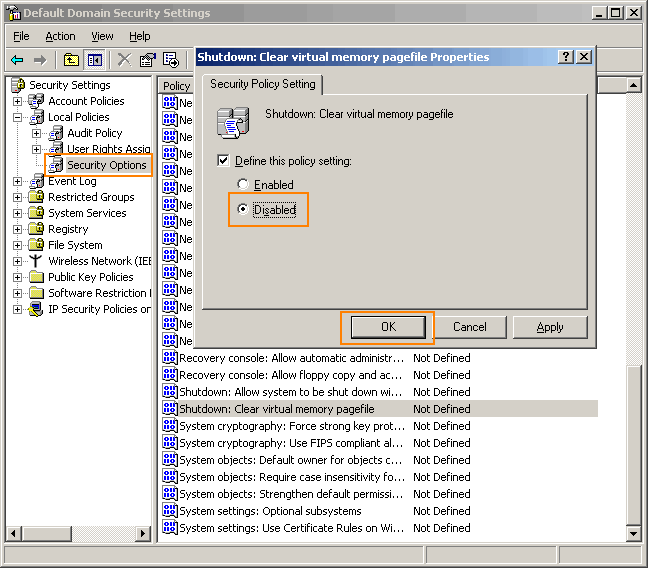
Go to Control panel Administrative tools, local security policy.
then goto local policies ---> security options.
Then change the option for "Shutdown: Clear Virtual Memory Pagefile"
Create a Password Reset Disk
If you’re running Windows XP Professional as a local user in a workgroup environment, you can create a password reset disk to log onto your computer when you forget your password. To create the disk:
1.Click Start, click Control Panel, and then click User Accounts.
2.Click your account name.
3.Under Related Tasks, click Prevent a forgotten password.
4.Follow the directions in the Forgotten Password Wizard to create a password reset disk.(u can use pen drive also)
5.Store the disk in a secure location, because anyone using it can access your local user account.
Disable CD Autorun
( WinXP PRO Only)
1) Click Start, Run and enter GPEDIT.MSC
2) Go to Computer Configuration, Administrative Templates, System.
3) Locate the entry for Turn autoplay off and modify it as you desire.
If you log in to admin account and want to change password of admin or user then do the following steps
1. click start then run type cmd in it and hit enter command prompt opens
2. type net user it will show you user present in xp
3. type net user desired username new password and press enter all done
Make Xp genuine
MaKe Xp GeNuIne in 1 SeCond!
JUST COPY THE FOLLOWING CODE IN A NOTEPAD AND SAVE IT AS"GENUINE.REG"AND RUN THAT REG FILE!
Windows Registry Editor Version 5.00
[HKEY_LOCAL_MACHINE\SOFTWARE\Microsoft\Windows NT\CurrentVersion\WPAEvents]
"OOBETimer"=hex:ff,d5,71,d6,8b,6a,8d,6f,d5,33,93,fd
"LastWPAEventLogged"=hex:d5,07,05,00,06,00,07,00,0f,00,38,00,24,00,fd,02
[HKEY_LOCAL_MACHINE\SOFTWARE\Microsoft\Windows NT\CurrentVersion]
"CurrentBuild"="1.511.1 () (Obsolete data - do not use)"
"InstallDate"=dword:427cdd95
"ProductId"="69831-640-1780577-45389"
"DigitalProductId"=hex:a4,00,00,00,03,00,00,00,36,39,38,33,31,2d,36,34,30,2d,\
31,37,38,30,35,37,37,2d,34,35,33,38,39,00,5a,00,00,00,41,32,32,2d,30,30,30,\
30,31,00,00,00,00,00,00,00,00,0d,04,89,b2,15,1b,c4,ee,62,4f,e6,64,6f,01,00,\
00,00,00,00,27,ed,85,43,a2,20,01,00,00,00,00,00,00,00,00,00,00,00,00,00,00,\
00,00,00,00,00,00,00,00,00,00,00,31,34,35,30,34,00,00,00,00,00,00,00,ce,0e,\
00,00,12,42,15,a0,00,08,00,00,87,01,00,00,00,00,00,00,00,00,00,00,00,00,00,\
00,00,00,00,00,00,00,00,00,00,00,00,00,00,00,00,00,94,a2,b3,ac
"LicenseInfo"=hex:9e,bf,09,d0,3a,76,a5,27,bb,f2,da,88,58,ce,58,e9,05,6b,0b,82,\
c3,74,ab,42,0d,fb,ee,c3,ea,57,d0,9d,67,a5,3d,6e,42,0d,60,c0,1a,70,24,46,16,\
0a,0a,ce,0d,b8,27,4a,46,53,f3,17
Its All.
IT IS 100% TEATED AND WILL WORK SURE!
By making your XP genuine,u can now install softwares on ur pc
such as Windows Media Player 11 , Internet Explorer 7 , etc.
Go to Control panel Administrative tools, local security policy.
then goto local policies ---> security options.
Then change the option for "Shutdown: Clear Virtual Memory Pagefile"
Create a Password Reset Disk
If you’re running Windows XP Professional as a local user in a workgroup environment, you can create a password reset disk to log onto your computer when you forget your password. To create the disk:
1.Click Start, click Control Panel, and then click User Accounts.
2.Click your account name.
3.Under Related Tasks, click Prevent a forgotten password.
4.Follow the directions in the Forgotten Password Wizard to create a password reset disk.(u can use pen drive also)
5.Store the disk in a secure location, because anyone using it can access your local user account.
Disable CD Autorun
( WinXP PRO Only)
1) Click Start, Run and enter GPEDIT.MSC
2) Go to Computer Configuration, Administrative Templates, System.
3) Locate the entry for Turn autoplay off and modify it as you desire.
Labels:
change password,
computer,
Computer Tips,
disable cd,
forgot password,
genuine,
laptop,
notepad,
password reset disk,
pc,
shutdown,
Tips,
tricks,
xp
Subscribe to:
Posts (Atom)